What is RAG?
In recent years, language models have transformed the way we interact with information. However, they have limitations when it comes to answering questions about recent, specific, or internal organizational data.
This is where Retrieval-Augmented Generation (RAG) comes in—a framework that combines the power of language models with real-time information retrieval systems, enabling more accurate, up-to-date, and context-adapted answers.
RAG not only expands the capabilities of models, but also opens the door to practical applications in multiple sectors, from academic research to customer service and business management.
What is Retrieval-Augmented Generation (RAG)?
Retrieval-Augmented Generation (RAG) is a hybrid AI framework that enhances language models by combining them with external and up-to-date data sources.
Instead of relying solely on static training data, RAG retrieves relevant documents in real time and incorporates them as context into the query. This allows the AI to generate more accurate, current, and personalized responses.
In fact, recent surveys indicate that more than 60% of organizations are already developing RAG-based applications to improve the reliability of their AI systems, reduce “hallucinations,” and personalize results with their own internal data.
How does RAG work?
The flow of a RAG application follows three main steps:
- Retrieval
- Augmentation
- Generation
The user’s query is used to search an external knowledge base (such as a vector or keyword database).
The retrieved data is combined with the original query to enrich it and provide relevant context.
The language model receives the augmented request and produces a response that integrates both its knowledge and the retrieved information.
The user’s query is used to search an external knowledge base (such as a vector or keyword database).
The retrieved data is combined with the original query to enrich it and provide relevant context.
The language model receives the augmented request and produces a response that integrates both its knowledge and the retrieved information.
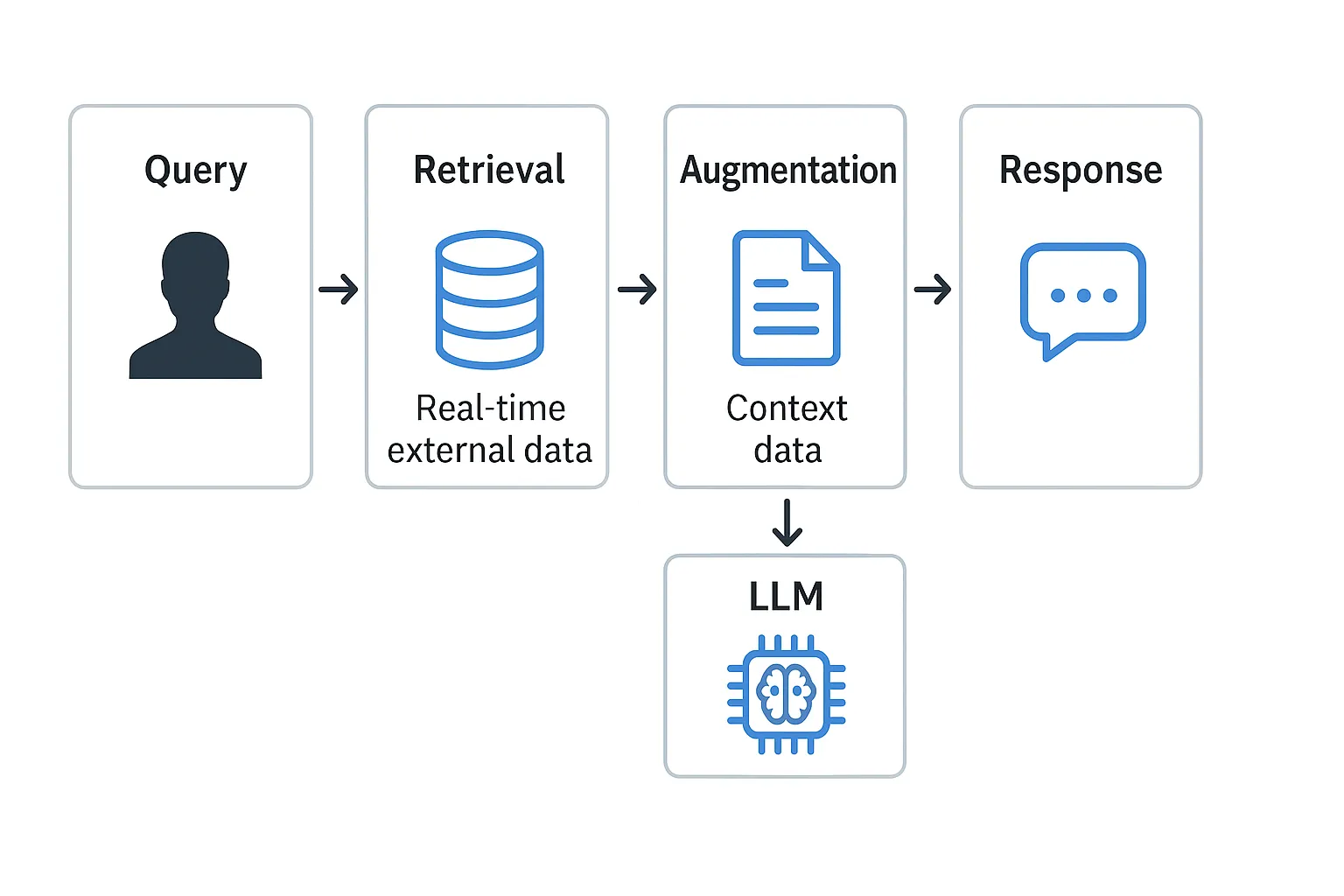
In practice, this translates into a four-phase pipeline:
- Document preparation and chunking: Documents are collected and divided into manageable chunks.
- Vector indexing: The chunks are converted into vectors and stored in a vector database.
- Information retrieval: The most relevant chunks are searched for in response to a user query.
- Augmentation and generation: The language model uses the retrieved chunks to generate a precise and contextualized response.
Thanks to this architecture, companies can update or expand their data sources without retraining the model, making RAG scalable, flexible, and cost-effective.
Problems RAG solves
- LLM knowledge limitation: integrates fresh information in real time.
- Need for personalization: adapts responses to each organization’s own data.
- Reduction of hallucinations: grounds responses in verifiable documents.
- Training costs: avoids retraining models from scratch, reducing investment and time.
RAG use cases
-
Customer service chatbots:
Provide accurate answers using the company’s knowledge base. Example: Experian implemented a RAG chatbot in Databricks to improve the accuracy of its responses.
-
Enterprise search engines:
Enrich results with AI-generated context and make it easier to find critical information quickly.
-
Internal knowledge management:
Answer queries about policies, benefits, or regulations. Example: Cycle & Carriage in Asia developed a RAG chatbot with Mosaic AI to access technical manuals and business processes.
-
Regulatory compliance:
Allow real-time consultation of regulations and documentation, reducing legal risks and improving traceability.
RAG data types: structured and unstructured
The RAG architecture can work with either unstructured or structured auxiliary data. The data you use with RAG depends on your use case.
🗂️ Unstructured data
Data without a specific structure or organization.
- PDF files
- Google/Office documents
- Wiki sites
- Images
- Videos
📊 Structured data
Tabular data organized in rows and columns with a defined schema.
- Customer records in BI
- SQL transaction data
- API data (SAP, Salesforce, etc.)
Key benefits of RAG
| Benefit | Description |
|---|---|
| Access to up-to-date information | Allows models to be complemented with recent external sources, overcoming the limitation of the data they were trained on. |
| Greater accuracy and relevance | Responses are enriched with documents or knowledge bases specific to the context. |
| Reduction of bias and hallucinations | By relying on retrieved evidence, the likelihood of fabricated or inaccurate responses is reduced. |
| Flexibility in integration | Can connect to multiple sources, such as databases, APIs, or document repositories. |
| Cost optimization | Avoids full retraining of large models, as it is enough to add or update the knowledge base. |
Common implementation challenges
- Retrieval quality: if the documents are not relevant, the answers lose value.
- Limited context window: too much information can be truncated or dilute the answer.
- Data freshness: indexes must be renewed to maintain freshness.
- Latency: information retrieval can introduce delays.
- RAG evaluation: requires technical metrics and human judgment to measure relevance and accuracy.
RAG vs. other LLM personalization techniques
When an organization wants to adapt a language model with its data, there are four main approaches:
- Prompt engineering: give optimized instructions to the model.
- RAG: integrate external data in real time.
- Fine-tuning: retrain the model on a specific dataset.
- Pretraining: train from scratch (costly and complex).
RAG is usually the ideal starting point due to its simplicity and cost-benefit, although it can be complemented with fine-tuning in specialized scenarios.
Practical example: Building a local RAG app with Ollama and ChromaDB in R
info
As a practical reference, we present a snippet from the FreeCodeCamp tutorial
How to Build a Local RAG App with Ollama and ChromaDB in R
. We encourage you to review the full content for greater depth.
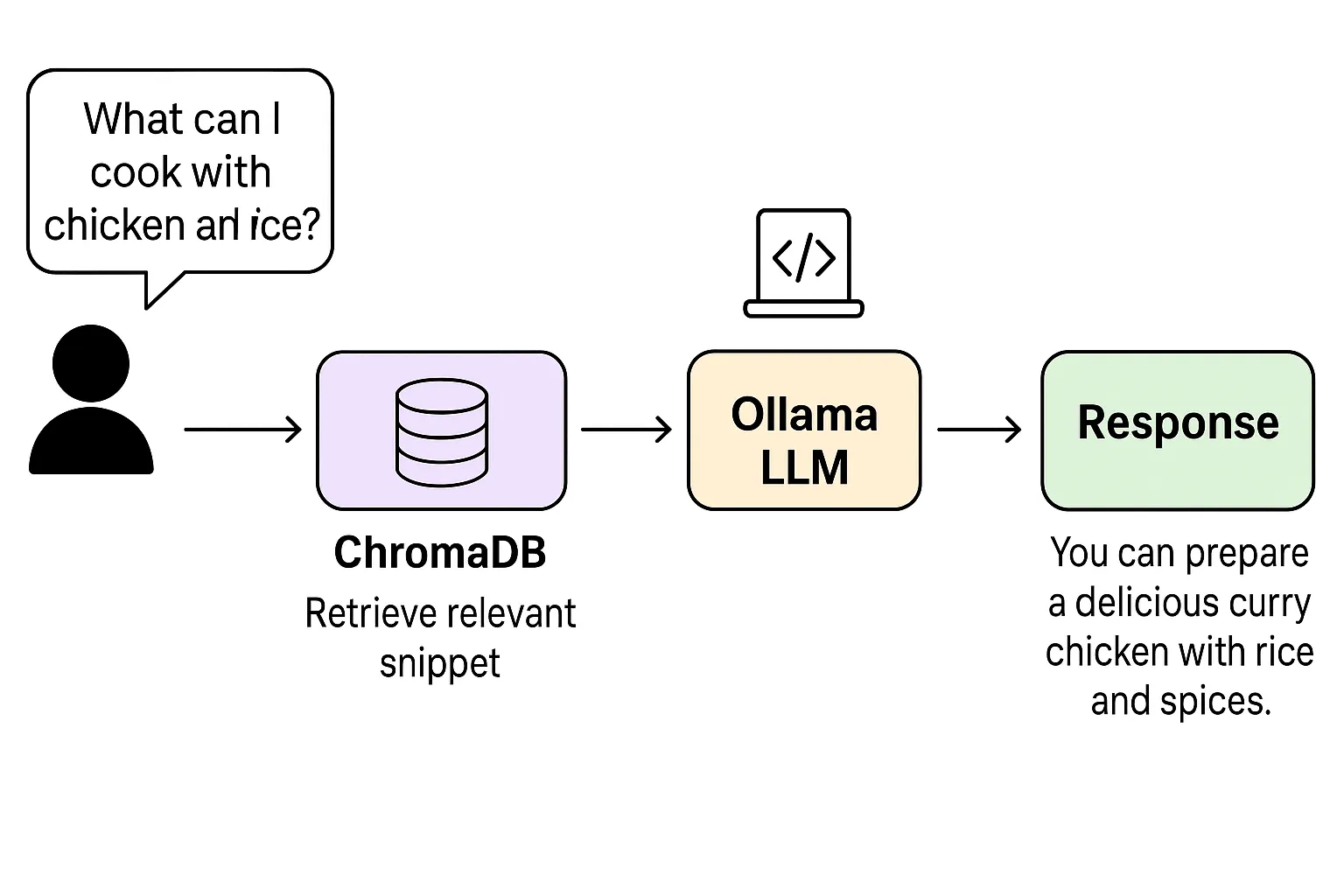
In this example, a culinary assistant is built that answers questions based on a set of locally stored recipes. The flow is as follows:
- Data loading and chunking: documents (recipes) are split into small chunks.
- Embeddings generation: each chunk is converted into a numeric vector with an embeddings model.
- Indexing in ChromaDB: the vectors are stored in a vector database.
- Retrieval and augmentation: upon receiving a question (e.g., “What can I cook with chicken and rice?”), the most relevant chunks are searched for and passed as context to the model.
- Response generation with Ollama: the model synthesizes the answer by integrating the retrieved information.
library(chromadb)
library(httr)

# 1. Define recipe documents
docs <- c(
	"Chicken curry with rice and spices",
	"Fresh tomato and cucumber salad",
	"Lentil soup with carrot and onion"
)

# 2. Connect to ChromaDB and create collection
chroma <- ChromaClient$new()
collection <- chroma$create_collection(name = "recipes")

# 3. Insert documents with embeddings
collection$add(
	documents = docs,
	ids = c("rec1", "rec2", "rec3")
)

# 4. Query the vector database
query <- collection$query(
	query_texts = "dish with chicken and rice",
	n_results = 1
)

print(query$documents)  # Returns the most relevant chunk
Flow diagram:
Conclusion
Retrieval-Augmented Generation (RAG) is redefining the way companies implement generative AI. By combining the power of language models with fresh, reliable, and domain-specific data, it offers a practical and scalable solution to create smarter, safer, and more business-aligned applications.
note
In the near future, RAG will not just be an option, but a standard in building enterprise AI solutions.